
Two long-overdue features arrive in Excel


It’s taken a while, but two long-requested features have finally arrived in Excel! They’re not exactly groundbreaking, but they’re welcome additions that make a couple of everyday tasks that little bit easier.
For those who want to name their tables…
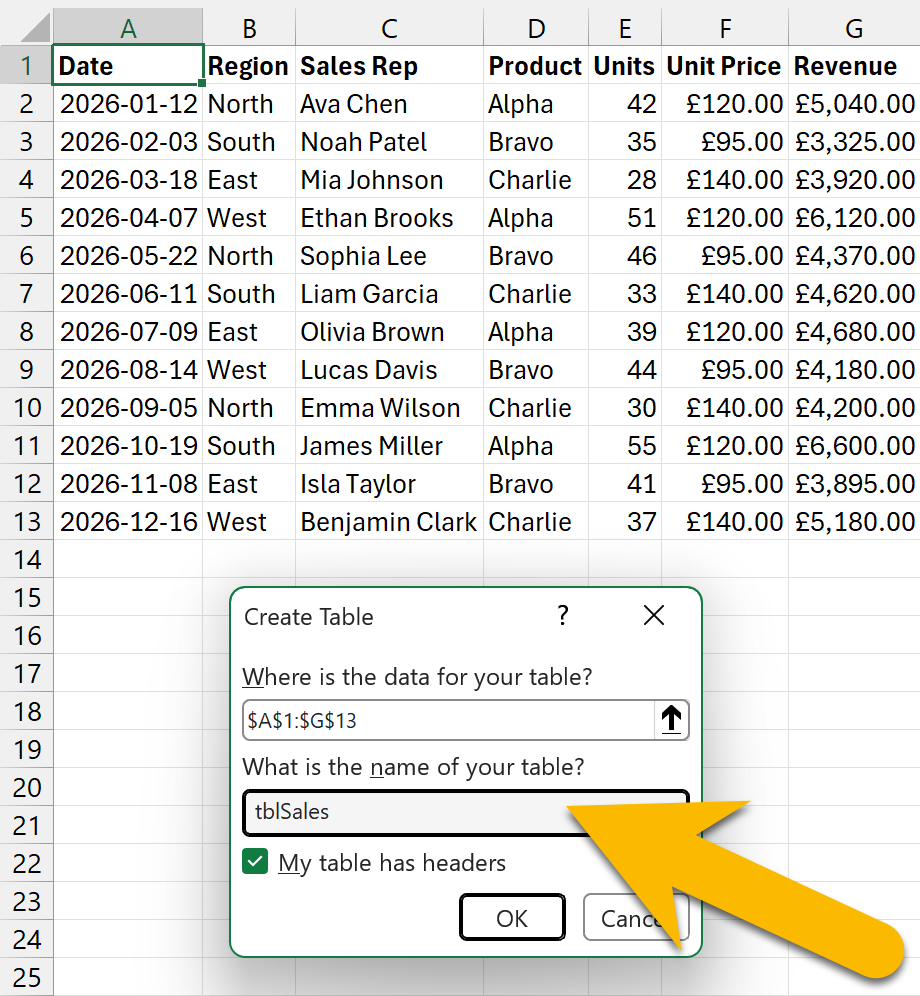
You can now name an Excel table as you’re creating it, rather than having to rename it afterwards.
To create one, select a cell within your data and go to Insert > Table, or press Ctrl + T. This opens the Create Table window, where you can check the range and specify whether your data has headers. Enter your table name here too, before clicking OK.
That means one less step to remember and a little encouragement to choose something more meaningful than the default name. Descriptive names also make tables easier to recognise in formulas.
For example, tblSales tells you rather more than Table1, particularly when you’re juggling several tables in the same workbook. Once you start using structured references, the name becomes even more useful: =SUM(tblSales[Revenue]) makes it clear what the formula is adding.
For those who hate merged cells…
Centre Across Selection is now available directly from the Merge & Centre dropdown on the Home tab, saving you a trip to the Format Cells window.
You can still find it there by going to the Alignment tab and choosing Centre Across Selection from the Horizontal dropdown, but having it on the ribbon makes it easier to reach.
It centres a heading across several cells without merging them, giving you the same visual effect while keeping the cells separate. That can make sorting and selecting ranges easier. Sometimes you just want a heading centred, not several cells turned into one.
Merged cells have always divided opinion. Some people love them, some hate them, and others couldn’t care less. Having both options together makes sense, though I wish the last-used option became the main button action. That would put Centre Across Selection a single click away.
And excuse the pedantry, but why isn’t its label in title case like the other options, especially when it is in the Format Cells window? A minor detail, perhaps, but an odd inconsistency.
Is it really that hard?
Changes like these make me curious about what goes on behind the scenes. Excel has decades of development behind it, along with all those existing workbooks that still need to function. What looks like a simple addition from the outside might involve far more work than we realise.
Who knows what the code looks like under the hood? Hopefully less like spaghetti than I imagine. I do wonder whether AI agents could help modernise it, or whether there would ever be a case for rebuilding Excel despite the inevitable headaches that would come with doing so.
It’s easy to imagine a cleaner version of Excel being simpler to develop and improve. But the challenge would be preserving legacy features and maintaining compatibility. That’s a mammoth task that shouldn’t be underestimated.