
Author: Andrew Moss

Andrew is a technical writer who specialises in Excel and data analysis. He has published hundreds of articles and social media posts aimed at helping people enhance their skills and spreading good practices.
  • RANDUNIQUE

    Introducing RANDUNIQUE — for when you want to return an array of unique random numbers. Three weeks ago, I showed a couple of methods of how to do this with formulas. () After a few refinements, those formulas have now…

  • MMULT Running Total

    Previously, I showed you how to use the SCAN function to calculate the running total with a single formula. However, given only Office Insiders can access it right now, it’s probably not wise to use it in shared workbooks. Thankfully,…

  • MMULT Function

    Excel functions like XLOOKUP and MATCH lack the ability to look up values in multiple rows or columns. However, this problem is circumvented with the help of MMULT, which returns the matrix product of two arrays. Before diving into the…

  • BYROW Function

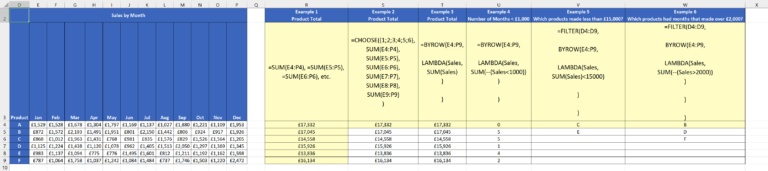
    Yesterday, I covered the new BYCOL function, which allows you to perform calculations on columns in an array. Guess what? There’s also a BYROW function! Predictably, it does the same thing for rows instead. Here’s the syntax: Whereas BYCOL calculated…

  • BYCOL Function

    The new BYCOL function is currently only available to Office Insiders, but it promises to make calculating columns easier and more efficient. The Sales by Month table contains monthly sales figures for six products. If you wanted to calculate the…