
Sheets finally gets tables

Spent about half an hour playing about with Sheets’ new table feature.
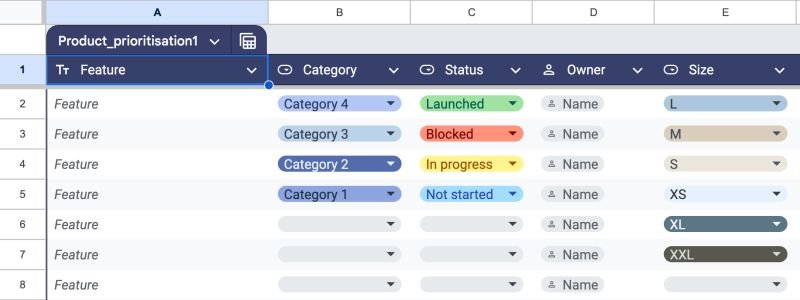
Predictably, it is comprehensively inferior to Excel’s, and the things we take for granted are not as intuitive.
You can sort, filter, use structured references, and customise the formatting. There are also auto-expand capabilities, grouping, and temporary view options.
Perhaps the biggest positive of all is the panel that pops up on the right side with a good range of pre-built options.
Some of this stuff works well enough, but there’s nothing that has particularly wowed me.
The thing that annoys me most is referencing. This is actually a long-standing issue in Sheets, but it’s worth mentioning.
If I want to reference an entire table to display elsewhere, why do I have to use =𝖠𝖱𝖱𝖠𝖸𝖥𝖮𝖱𝖬𝖴𝖫𝖠(𝖳𝖺𝖻𝗅𝖾𝟣[#𝖠𝖫𝖫]) instead of =𝖳𝖺𝖻𝗅𝖾𝟣[#𝖠𝖫𝖫])?
Reliance on ARRAYFORMULA is a problem that affects standard cell ranges as well as various functions.
I don’t get why dynamic array capabilities have still not rolled out in Sheets in the same way they have in Excel.
Anyway, give Sheets’ tables a go and see what you think. Simply go to Insert > Tables to get started!